- Published on
Typescript: More On Functions
- Authors

- Name
- 최영준 (Youngjun Choi)
More On Functions😃
타입스크립트에서 함수를 다루는 법을 알아보자
Function Type Expressions
타입스크립트에서 fuction을 표현할 때 기본적으로 parameter와 return 값에 대해 타입으로 표현한다. Parameter type의 경우 타입을 정해주지 않으면 any로 정해진다.
function greeter(fn: (a: string) => void) {
  fn("Hello, World")
}

function printToConsole(s: string) {
  console.log(s)
}

greeter(printToConsole)
Call Signatures
자바스크립트에서 함수는 객체다. 이점이 중요한 점은 함수가 속성을 가질 수 있다는 의미이기 때문인데, function type annotation에서는 속성을 할당하지 못하게 한다. 속성을 할당하고 싶다면 해당 속성에 대한 call signature를 할당해야 한다.
type DescribableFunction = {
  description: string
  (someArg: number): boolean
}
function doSomething(fn: DescribableFunction) {
  console.log(fn.description + " returned " + fn(6))
}

function myFunc(someArg: number) {
  return someArg > 3
}
myFunc.description = "default description"

doSomething(myFunc)
Construct Signatures
자바스크립트에서 함수 선언문으로 정의된 함수는 모두 생성자 함수로 쓰일 수 있기 때문에 new 키워드가 사용될 수 있다.new키워드를 이용한 타입 정의를 통해 construct signature를 정의할 수 있다.
type SomeConstructor = {
  new (s: string): SomeObject
}
function fn(ctor: SomeConstructor) {
  return new ctor("hello")
}
Generic Functions
보통 param의 타입과 반환값의 타입은 관련이 있거나 param들간의 타입이 관계가 있다. any를 사용하지 않고 우리가 원하는 타입으로 좁혀서 재사용하는 방법으로 generic을 이용할 수 있다.
function firstElement<Type>(arr: Type[]): Type | undefined {
  return arr[0]
}

// s is of type 'string'
const s = firstElement(["a", "b", "c"])
// n is of type 'number'
const n = firstElement([1, 2, 3])
// u is of type undefined
const u = firstElement([])
inference
inference는 타입을 직접 정하는 것은 아니지만 typescript를 통해 추론되는 타입을 의미한다.
function map<Input, Output>(
  arr: Input[],
  func: (arg: Input) => Output
): Output[] {
  return arr.map(func)
}

const parsed = map(["1", "2", "3"], n => parseInt(n)) // parsedsms number[]이야
Constraints와 오류
generic을 이용해서 연관있는 input 타입들의 관계를 정의했지만 어느정도 우리가 원하는 타입으로 좁힐 수 있다. 좁힐 때는 extends를 통해 해당 속성을 가지고 있는 타입 등으로 좁힐 수 있다.
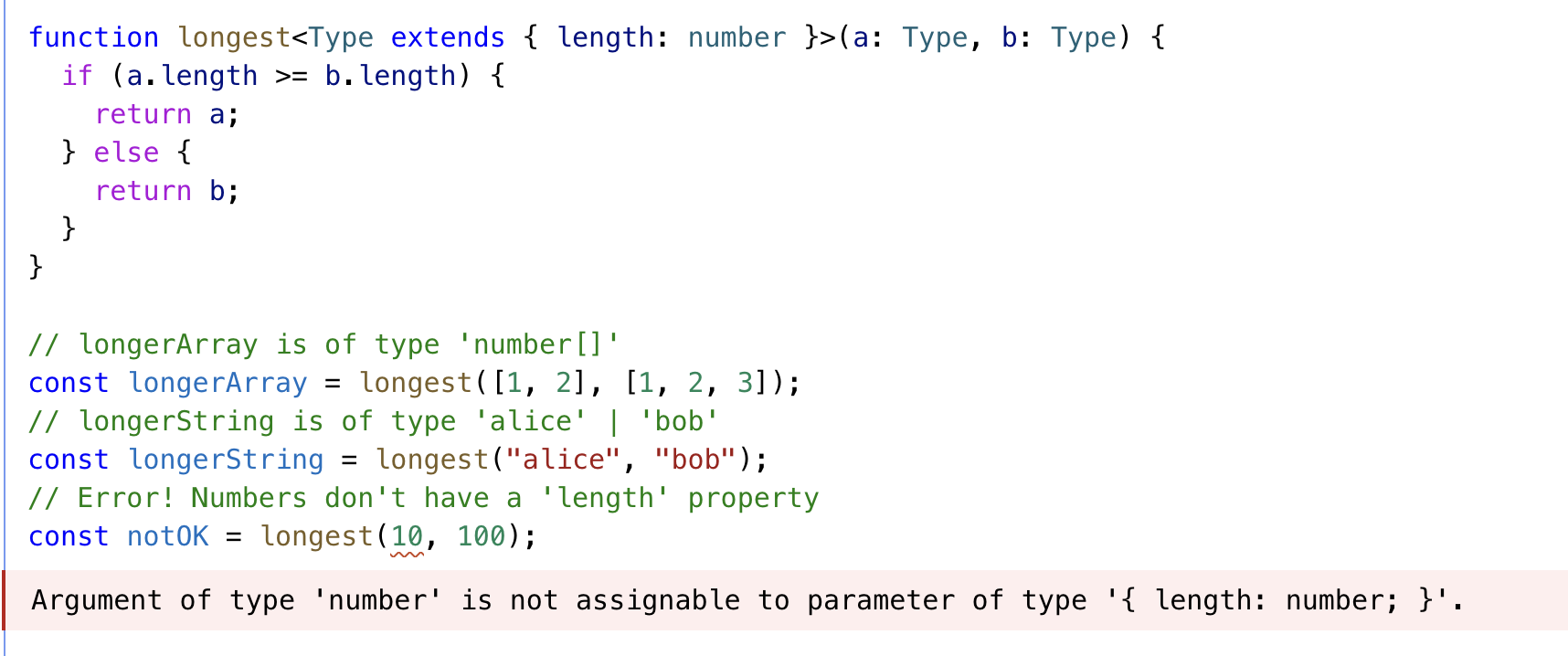
이런 Generic을 이용한 타입 좁히기는 유용할 수 있지만 조심해야할 부분이 있다.
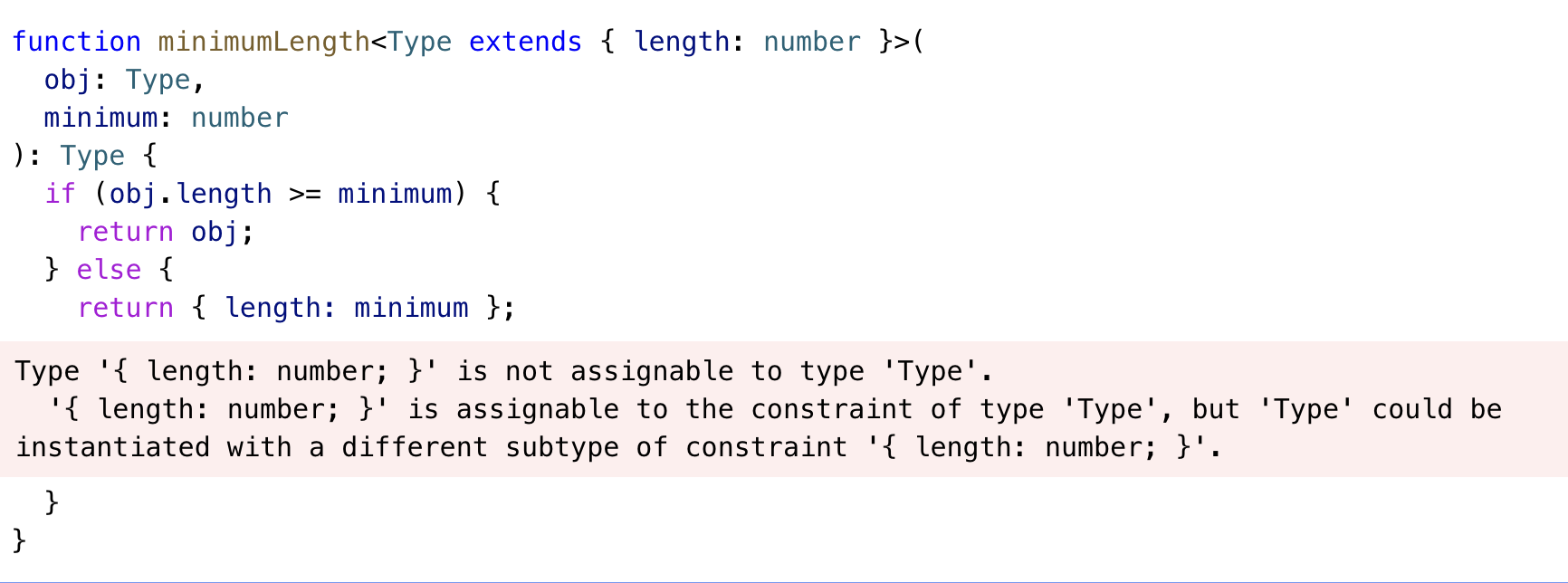
위 코드에서 에러가 난 이유는 우리 Generic으로 전달한 인자의 타입이 반환값으로 그대로 반환될 것라고 선언했다. 하지만 else문 안에는 좁혀진 범위의 객체를 반환하기 때문에 기존과 다른 타입이기 때문에 타입에러가 났다. 타입스크립트에서 큰 집합은 작은 집합에 할당될 수 있지만, 그렇다고 큰집합이 작은 집합이라고 할 수는 없다.
사자는 동물에 포함된다 라는말은 사자가 동물에 포함되기 때문에 맞지만, 사자와 동물은 같다라는 말에는 오류가 있는 것과 같다.
Guidelines for Writing Good Generic Functions
Generic 함수를 잘 작성하는 방법 3가지를 정리해보자.
- Push Type Param Down: param을 더 구체적인 값으로 사용한다.
function firstElement1<Type>(arr: Type[]) {
  return arr[0]
}

function firstElement2<Type extends any[]>(arr: Type) {
  return arr[0]
}

// a: number (good)
const a = firstElement1([1, 2, 3])
// b: any (bad)
const b = firstElement2([1, 2, 3])
- Use Fewer Type Parameters: 더 적은 타입의 param으로 이용한다.
function filter1<Type>(arr: Type[], func: (arg: Type) => boolean): Type[] {
  return arr.filter(func)
}

function filter2<Type, Func extends (arg: Type) => boolean>(
  arr: Type[],
  func: Func
): Type[] {
  return arr.filter(func)
}
filter2의 경우는 어떤 함수 타입인지 일일이 정해줘야하므로 사용처에서 불편함이 존재한다.
- Type Parameters Should Appear Twice: 재사용이 필요한 상황에만 제네릭을 쓰자.
function greet<Str extends string>(s: Str) {
  console.log("Hello, " + s)
}

greet("world")

function greet(s: string) {
  console.log("Hello, " + s)
}
훨씬 간단하게 사용할 수있는 방법을 고민해보고, 반복되는 타입에 한해서 재사용을 위해 제네릭을 쓰자.
Optional Parameters
param이 없을 수 있는 경우를 위해 ?를 이용할 수 있다. 이렇게 사용하게 되면 T|undefined 로 타입이 할당된다.
function f(x?: number) {
  // ...
}
f() // OK
f(10) // OK
또는 param이 없을 때를 위한 기본 값을 parameter default로 정의할 수 있다.
function f(x = 10) {
  // ...
}
주의할 점은 callback을 이용할 때의 의미는 optional한 parameter는 필요없이 호출 될 수 있음을 의미하는 것이니까 불필요하게 사용하지 말자.

Function Overloads
함수 오버로드는 평소에 잘 사용하지 않던 부분이다 보니 이해하는데 어려움이 있었다. 함수 Overload는 같은 이름의 함수에 param이 다르게 정의하는 방법이다.
function makeDate(timestamp: number): Date
function makeDate(m: number, d: number, y: number): Date
function makeDate(mOrTimestamp: number, d?: number, y?: number): Date {
  if (d !== undefined && y !== undefined) {
    return new Date(y, mOrTimestamp, d)
  } else {
    return new Date(mOrTimestamp)
  }
}
const d1 = makeDate(12345678)
const d2 = makeDate(5, 5, 5)
Overload 함수를 작성하는데에는 몇가지 규칙이 있다.
- 인자가 없을 때의 어떤 함수인지 구현이 필요하다.
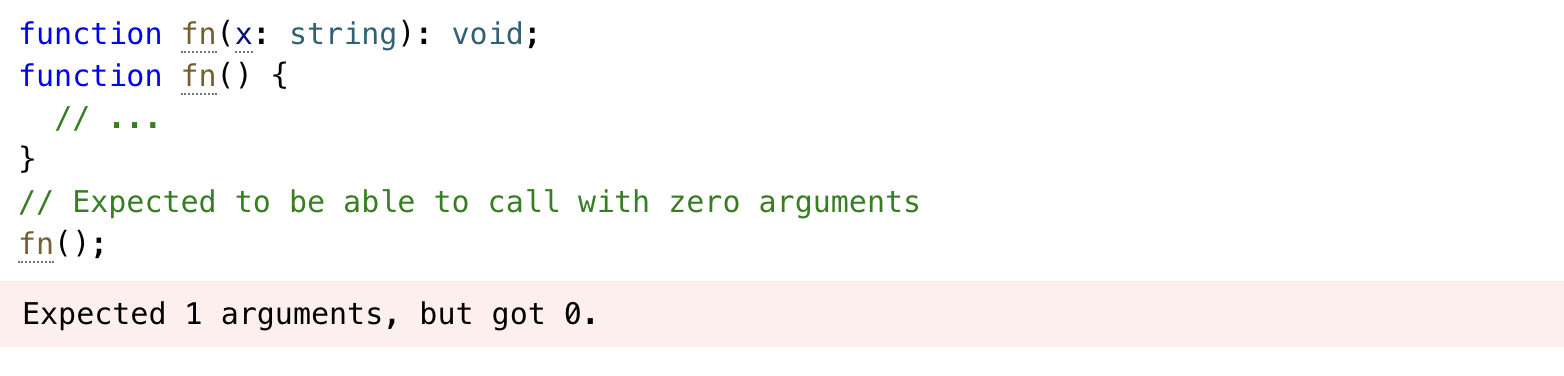
위 예제에서 에러가 발생한 이유는 param이 없을 때의 함수가 어떻게 구현될지 정의되지 않았기 때문이다.
아래와 고치면 타입에러가 사라지는 것을 볼 수 있다.
function fn(x: string): void
function fn(): void
function fn() {
  // ...
}
// Expected to be able to call with zero arguments
fn()
- Overload 끼리 compatible해야한다.

위 예제에서 같은 param 갯수를 가지는 overload 함수를 작성했다. 타입에러가 발생한 이유는 먼저 작성한 overload 함수 param 타입이 boolean으로 정의된 상황에서 같은 param 갯수를 가지는 두번째 overload 함수에서 boolean타입과 compatible 하지 않은 string 타입으로 정의했기 때문이다.
- Overload 함수는 조건부로 쓰이면 안된다.
function len(s: string): number
function len(arr: any[]): number
function len(x: any) {
  return x.length
}
위 예제는 string과 array를 param으로 받을 수 있는 함수 overload가 정의된 상황이다.
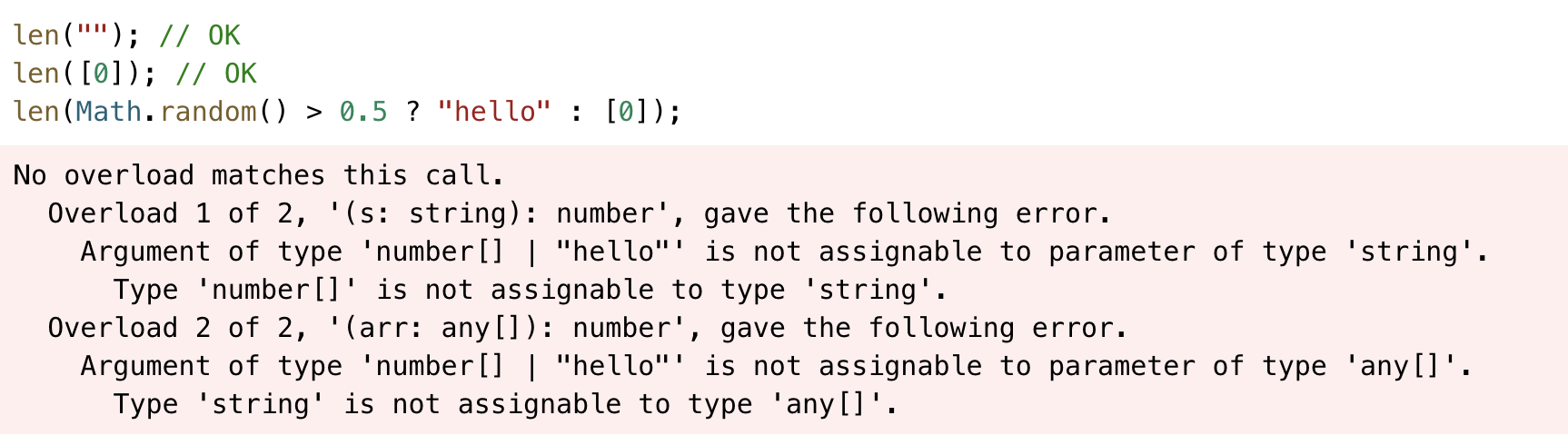
위 타입에러는 조건에 따라 다른 타입의 param을 전달하는 상황이기 때문에 발생했는데, 그 이유는 타입스크립트는 하나의 overLoad에서만 함수를 호출하기 때문이다. 이럴때는 param을 정의할 때 union type으로 정의하는 게 더 올바른 방법이다.
function len(x: any[] | string) {
  return x.length
}
this 다루기
javascript에서의 this 처럼 typescript의 this도 동적으로 정의된다.
const user = {
  id: 123,
  admin: false,
  becomeAdmin: function () {
    this.admin = true
  },
}
위 예제에서 this는 암시적 바인딩에 의해 호출되는 위치에 따라 다른 값을 의미하게된다.
이러한 this를 상대적으로 쉽게(?) 정의하는 방법으로 화살표함수를 이용하는 방법이 있다. 화살표 함수는 함수 선언식과 다른 특징이 있는데 그중 생성자 함수로 쓰일 수 없다는 점이 있다. 그렇기 때문에 자체적인 this를 가지지 않고 화살표 함수에서 this는 상위 스코프의 this를 참조하는 규칙 가진다.
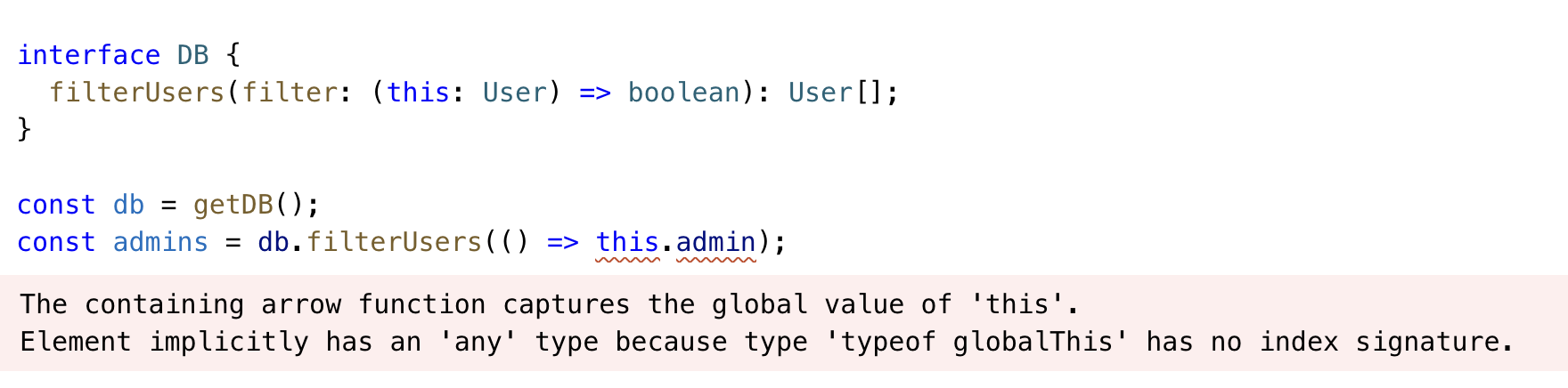 위 코드에서 타입 에러가 발생한 이유는 화살표함수로 정의된 메소드의 this는 상위 스코프인 globalThis이기 때문이다.
Other Types to Know about
몇가지 앞서 소개되지 않았던 타입들에 대해 정리해보자.
- Void
함수에서 반환하는 값이 없을 때를 위한 타입으로, return 문이 없을 때 자동으로 undefined이 반환되지만 타입스크립트에서는 따로 void로 정의한다.
- unknown
any와 유사하지만, any와 달리 어떤 속성을 가지는 지 알 수 없기 때문에 속성에 접근할 수 없다. 주로 try-catch 문으로 에러를 받을 때 unknown으로 반환되기 때문에 비즈니스 에러로 적절하게 타입을 정의한 후 instanceOf 를 이용해 에러 객체를 정의하는 방식으로 현업에서 사용하고 있다.
- never
never는 어떤 것도 포함될 수 없는 타입을 의미한다. union이나 switch문에서 더이상 없다는 것을 의미한다.
function fn(x: string | number) {
  if (typeof x === "string") {
    // do something
  } else if (typeof x === "number") {
    // do something else
  } else {
    x // has type 'never'!
  }
}
Rest Parameters and Arguments
Rest Parameter는 인자가 동적으로 들어올 때의 param을 의미한다. arguments로 받을 param의 타입들을 정의할 수 있다.
function multiply(n: number, ...m: number[]) {
  return m.map(x => n * x)
}
// 'a' gets value [10, 20, 30, 40]
const a = multiply(10, 1, 2, 3, 4)
rest parameter를 생길 수 있는 타입에러로는 배열과 튜플의 타입 차이에서 발생할 수 있다.

위 예제에서 Math.atan2(...)메소드는 딱 두개의 인자를 받지만 args는 number[]로 타입이 되어있기 때문에 몇개의 값이 더 들어올지 모르는 타입을 의미해 생긴 타입 에러다.
이를 해결하기 위해서는 배열이 아니라 몇개의 요소로 되어있는 타입인지 정의된 tuple을 이용하면 해결할 수 있다.
const args = [8, 5] as const
// OK
const angle = Math.atan2(...args)
Parameter Destructuring
객체 param을 전달할 때 각 속성에 대한 타입을 정의해서 전달할 수 있다.
type ABC = { a: number; b: number; c: number }
function sum({ a, b, c }: ABC) {
  console.log(a + b + c)
}
Assignability of Functions
void를 반환타입으로 가지는 함수들 끼리 가지는 특이한 특징이 있다. void 자체는 해당 함수들이 반환하는 타입에 대해 강하게 타입을 따지지 않기 때문에 반환 타입이 무시된다.
type voidFunc = () => void

const f1: voidFunc = () => {
  return true
}

const f2: voidFunc = () => true

const f3: voidFunc = function () {
  return true
}
위 예제에서 f1,f2,f3 다 반환하는 타입이 boolean이지만 voidFunc로 정의해도 타입에러가 발생하지 않는다.
function f2(): void {
  return true // 에러 발생
}
하지만 직접 정의할 때 void를 반환한다고 정의할 시에 타입 에러가 걸리게 된다.